Until now, Manus operated entirely in a cloud-based setup with its own tools and environment. The company said the new release is intended to bridge that gap by bringing the agent into the user’s personal computing environment, where most files, software and workflows reside.
Through the desktop app, Manus executes commands in the system’s terminal, allowing it to read, modify and organize files or launch applications. This approach opens up a broader set of tasks, including file management, development workflows and automation of repetitive processes.
The company highlighted everyday use cases such as organizing large collections of images or renaming batches of documents. It also demonstrated more advanced scenarios, including building applications entirely through command-line instructions. In one example, the agent created and packaged a working Mac application without manual coding.
The feature also allows Manus to tap into local hardware resources, including GPUs, enabling tasks such as running models or processing data directly on a user’s device. Users can assign work remotely, with the agent completing tasks on their home or office machine as long as the desktop app is running.
To address security concerns, Manus requires users to approve each command before execution. Users can grant one-time or ongoing permissions depending on the task, maintaining control over how the agent interacts with their system.
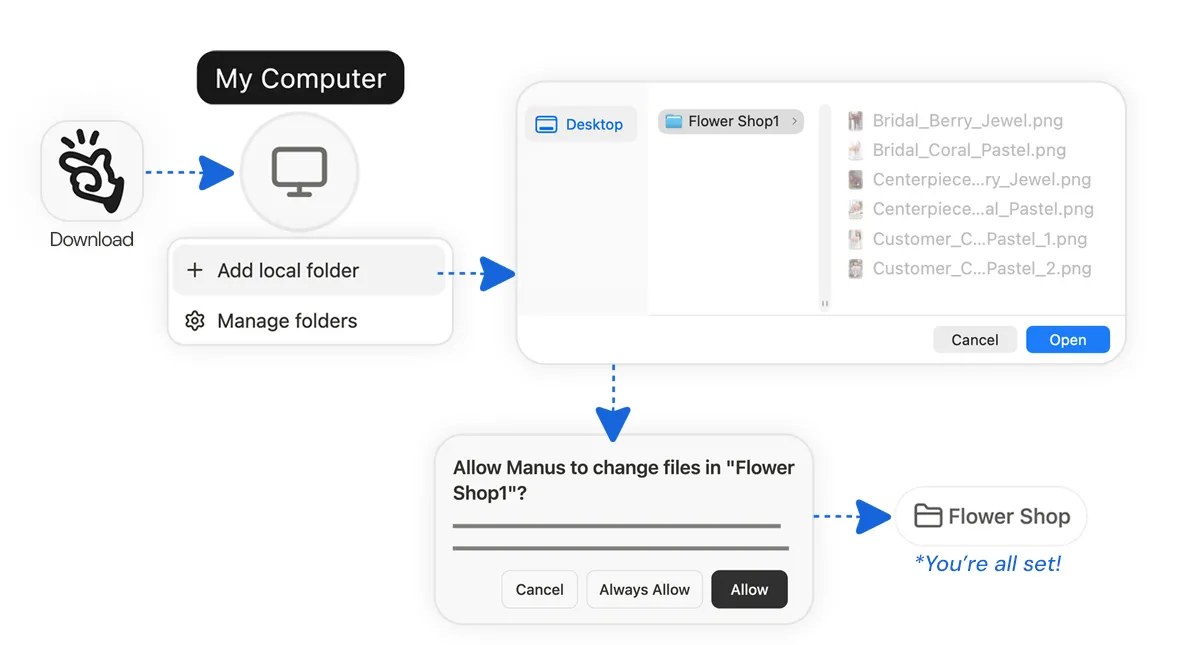
The company said the feature integrates with its existing tools, including connections to services like Gmail and Google Calendar, allowing workflows that combine local files and cloud-based actions. For example, users can retrieve documents stored on their computer and send them via email without manually accessing the device.
“My Computer” is positioned as a core addition to Manus’s platform, expanding its role from a cloud-based assistant to a system that can operate across both local and remote environments.
My Computer is available now for all macOS and Windows users.
This analysis is based on reporting from TestingCatalog.
Images courtesy of Manus.
This article was generated with AI assistance and reviewed for accuracy and quality.
